Enterprise Nodal Structure
 Admin User
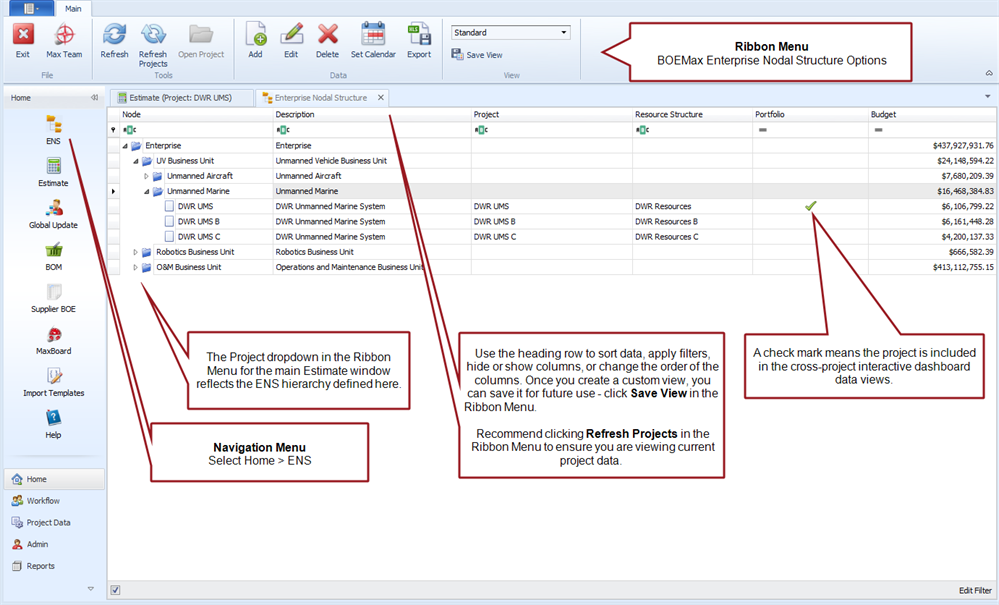
The enterprise nodal structure (ENS) is a hierarchical framework for reviewing total project values and organizing projects into categories for cross-project reporting or analysis. The default view is a simple list of projects you can use to quickly review total values at the Enterprise level or for each project. You can add user defined nodes or levels to the ENS to organize your projects into groups so you can review total values at various levels in the structure. You determine the hierarchy levels and how you want to group projects together to fit your business environment. For example, you could organize projects into nodes by division, business line, location, or customer. You can add user defined codes or fields as needed to include other attributes useful for sorting or filtering the projects.
The ENS is common to all projects within a given ProjStream tool (BOEMax, MaxTeam or EVMax). The data columns and options available are dependent on which ProjStream tool you are using. For example, the ENS in BOEMax includes a total Budget column for proposal projects. The ENS in MaxTeam or EVMax includes additional columns for active or completed projects such as Budget at Completion, Planned Value (budget), Earned, Actual, Estimate at Completion (EAC), Estimate to Complete (ETC), and variance calculations.
When you are sharing data between BOEMax and MaxTeam or EVMax, the list of projects in the ENS can be different depending on which projects transition from the proposal to execution phase. When you have created user defined node levels, recommend the BOEMax ENS node levels match the MaxTeam or EVMax ENS node levels.
Once you create your ENS hierarchy, you can select a node to produce reports for that group of projects. You can use any standard report or user defined report that includes the Mode option. Selecting the Program Mode enables a Program dropdown for you to select any level of the ENS hierarchy to produce the report.
 Implementation Tips
- When you select a project in the main Estimate (BOEMax), MaxTeam or EVMax window, the Project dropdown in the Ribbon Menu reflects the ENS you have set up for each ProjStream tool.
- Recommend routinely clicking in the Ribbon Menu to ensure you are viewing current project data.
- Any new projects you create are assigned to the default Enterprise level. Once you have created your ENS hierarchy, remember to assign any new projects you create to the applicable ENS node. When you copy an existing project to create a new project, the source project ENS settings are copied over to the new project.
Enterprise Nodal Structure Tab
Example BOEMax ENS